Using Playroom Kit with Godot 3 & 4 (Web only)
Godot is a free and open-source game engine. Godot has JavaScriptBridge support (JavaScript in Godot 3), which connects the engine with the browser’s JavaScript. We can use this to use Playroom Kit with Godot.
Setup
-
In your Godot 3 or 4 project, you need to enable Web Export. You can do this by going to
Project > Export > Addand clickingWeb. -
With
Webselected, add Playroom Kit to theHTML > Headsection:
<script src="https://unpkg.com/playroomkit/multiplayer.full.umd.js" crossorigin="anonymous"></script>You can close the export window now.
- If you completed the above steps correctly, you should see a
Run in browsermenu option in when you click theRemote Debugbutton:
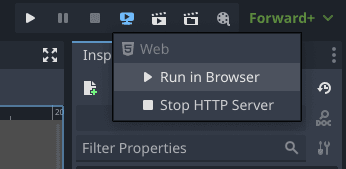
Using Playroom Kit in GDScript
To initialize Playroom Kit in your game (show the Playroom Kit lobby screen), you need to call Playroom.insertCoin() in some script. It’s best practice to have this be a script attached to a new default node, or your root node.
insertCoin and other Playroom Kit functions also support providing a callback function. You need to make your GDScript callback function available to the JS context.
Here is an example of how to initialize Playroom Kit when the game starts:
Godot 4
extends Node2D

#Fetch Playroom Kit
var Playroom = JavaScriptBridge.get_interface("Playroom")

# Keep a reference to the callback so it doesn't get garbage collected
var jsBridgeReferences = []
func bridgeToJS(cb):
	var jsCallback = JavaScriptBridge.create_callback(cb)
	jsBridgeReferences.push_back(jsCallback)
	return jsCallback


func _ready():
	JavaScriptBridge.eval("")
	var initOptions = JavaScriptBridge.create_object("Object");

	#Init Options
	initOptions.gameId = "<YOUR GAME ID>"

	#Insert Coin
	Playroom.insertCoin(initOptions, bridgeToJS(onInsertCoin));

# Called when the host has started the game
func onInsertCoin(args):
	print("Coin Inserted!")
	Playroom.onPlayerJoin(bridgeToJS(onPlayerJoin))

# Called when a new player joins the game
func onPlayerJoin(args):
	var state = args[0]
	print("new player joined: ", state.id)

	# Listen to onQuit event
	state.onQuit(bridgeToJS(onPlayerQuit))

func onPlayerQuit(args):
	var state = args[0];
print("player quit: ", state.id)The above code will show the familiar Playroom Kit lobby when you start the game. Players can host and join rooms without any code on your side.
When the host starts the game, the onInsertCoin callback will be called. The onPlayerJoin callback will be called when the host starts the game. It fires for each player connected so you can do things such as spawn characters. When a player quits the game, the onPlayerQuit callback will be called, so you can remove their character.
Do note that Playroom Kit will not work in the Godot editor. You need to export your game and run it in the browser.
You can use the Run in browser option in the Remote Debug menu to quickly build and open your game in the browser.
If you host the game on your own server, Godot 4 requires the following headers to be present, add these in your .htaccess or in whatever way your server lets you:
Cross-Origin-Opener-Policy: same-origin
Cross-Origin-Embedder-Policy: require-corp
Usage
The use of the Playroom Kit API is very similar to the web API but it still has its differences. For example, to use getState you would type yourVar = YourPlayroomReference.getState("your state"). Using this in an actual project would look something like this: var points = Playroom.getState("points").
If you are competent with Chrome dev tools or the inspect element menu. In that case, you can mess around with Playroom Kit in the console by doing things like Playroom.me(), etc. to figure out what the Godot equivalent commands are for things like the React or Unity APIs, if you are coming from one of those.
Simple Demo
See the full source code for this demo. Here is source code for the Godot 4 version.
Next Steps
- You should be able to use most of Playroom Kit API to build your game.
- You can use On-screen Joystick to easily add a joystick on screen.
FAQs and Tips
How do I display the profile picture of a player?
PlayroomPlayer.GetProfile().photo is formatted as data:image/svg+xml,{svg encoded for url}. Churrosaur from our Discord community shared this code snippet to display the player’s profile picture in Godot:
func _parse_dataurl(data_url : String) -> Image:
	var url_data = data_url.split(",")[1] # clips the preface
	var svg_data = url_data.uri_decode() # String.uri_decode() - parses uri

	var image = Image.new()
	var error = image.load_svg_from_string(svg_data) # loads svg from string
	if error != OK:
			push_error("Couldn't load the image.")

	return image
How do I display QR code for joining the game?
You can use JavaScriptBridge.eval(window.location.href) to get the current URL (which includes room code) and then use any QRCode library like this to display QR code in Godot.
How do I get a list of player states that I can use to set the states of players?
When a player joins, you would have to add them to a list of players. Use something similar to the below:
var players : Array
# Called when a new player joins the game
func onPlayerJoin(args):
	var state = args[0]
	print("new player: ", state.id)
	players.append(args[0])
	print(players, args)

	# Listen to onQuit event
	state.onQuit(bridgeToJS(onPlayerQuit))
If you want to instantiate player objects, you would add those to another list in a similar way. To get both the player objects and their states and do something to them for each player you could do something similar to the following:
#In process()...

#Iterate thru each player
for i in len(players):
	current_player = players[i]
	current_obj = player_objs[i]

	#Do something. In this case, we set the position of the current player obj to the state of the corresponding object
	current_obj.position.x = current_player.getState("xpos")
	current_obj.position.y = current_player.getState("ypos")
How do I sync objects across multiple players?
This is tricky. You need to make a spawn function that appends each object to a list which then is set as a global Playroom Kit state which all of the other clients can intercept. You would need a spawn function and a silent spawn function (if the client loses and object) that do something similar to the below:
#Spawn our object and sync it with all of the other objects
func spawn(object : String, posx : int, posy : int):
	var pos = Vector2(posx,posy)
	var obj = load(object)
	var inst = obj.instantiate()
	add_child(inst)
	var rng = RandomNumberGenerator.new()
	inst.global_position.x = pos.x
	inst.global_position.y = pos.y
	inst.name = idgen(10)
	sync_objs.append([inst.name,object,posx,posy])
	Playroom.setState("objs",str(sync_objs))
	return inst

#Silently spawn an object if we lose it; don't sync it with other players
func silent_spawn(object : String, posx : int, posy : int, id : String):
	var pos = Vector2(posx,posy)
	var obj = load(object)
	var inst = obj.instantiate()
	add_child(inst)
	inst.global_position.x = pos.x
	inst.global_position.y = pos.y
	inst.name = id
	sync_objs.append([inst.name,object,posx,posy])
Then you can do the following to sync all the objects:
var pre_objs = str(Playroom.getState("objs"))
	var objs = str_to_var(pre_objs)
	for i in len(objs):
		if i > len(sync_objs):
			#silently spawn in on our client
			silent_spawn(objs[i][1],objs[i][2],objs[i][3], objs[i][0])

	#Sync our objects with whoever controls the objs variable (the host)
	for i in objs:
		if get_node(NodePath(i[0])) = null:
			print("We seem to have lost the object ",i[0])
			#Spawn one for us
			silent_spawn(i[1],i[2],i[3],i[0])

	for i in sync_objs:
		i[2] = get_node(NodePath(i[0])).global_position.x
		i[3] = get_node(NodePath(i[0])).global_position.y
	Playroom.setState("objs",str(sync_objs))
	print(sync_objs)
Then we can spawn the objects like this:
#This returns itself, so you can set some vars if you want
spawn(your_object_instance, its_x, its_y).a_var_to_set = "this is optional but you can do it"
Modify the code to see what fits your game. You can do a lot more than just positions, but it can make your functions really long.
🔗Links
Downloads
Godot 4 Download Godot 3 Download
JavaScript in Godot Resources:
Js Bridge Documentation (Godot 4) Js Bridge Documentation (Godot 3)
Credits
Thanks to BigS [[hot]] and Churrosaur on our discord for tips, code snippets, etc.